
Who is it suitable for?

TMCraft(1)
TMCraft(1)
TMCraft2
TMCraft2
What kinds of plugins can you develop?



TMcraft Service 1
TMcraft Node, a versatile plugin architecture (based on C# and WPF) that empowers developers to create custom nodes for use within TMflow projects. Each TMcraft Node consists of two key components: a user interface (UI) and script interpreting. The UI allows users to easily configure settings tailored to their specific needs. Once the UI is closed, the program gathers these settings and generates a corresponding script that is directly integrated into the flow project. When the project runs and reaches the TMscript Node, this script is executed, enabling customized actions. TMcraft Node not only enhances flexibility but also streamlines the development of highly specialized workflows within the TMflow environment.
TMcraft Node, a versatile plugin architecture (based on C# and WPF) that empowers developers to create custom nodes for use within TMflow projects. Each TMcraft Node consists of two key components: a user interface (UI) and script interpreting. The UI allows users to easily configure settings tailored to their specific needs. Once the UI is closed, the program gathers these settings and generates a corresponding script that is directly integrated into the flow project. When the project runs and reaches the TMscript Node, this script is executed, enabling customized actions. TMcraft Node not only enhances flexibility but also streamlines the development of highly specialized workflows within the TMflow environment.

TMcraft Service 2
test

TMCraftTMCraft3
test
TMcraft Node4
test

TMcraft Setup5
test
TMcraft Toolbar6
test
You May Wonder
How does TMcraft plugin works? TMcraft API
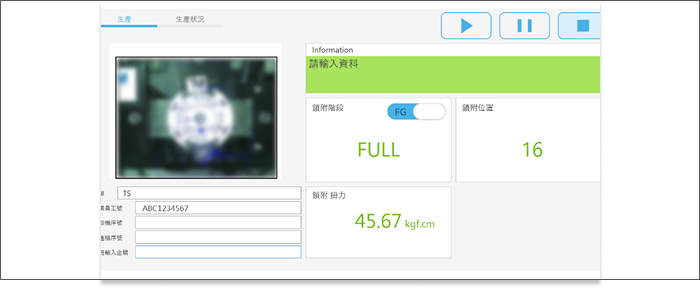
Introducing TMcraft Setup, an innovative plugin architecture (based on C# and WPF) embedded within TMflow, designed to enhance the functionality of your flow projects. Acting as a customizable UI program, TMcraft Setup allows developers to create intuitive control panels for device management, streamlining user interactions. But what truly sets TMcraft Setup apart is its ability to define and automate project initialization. By configuring the application through the TMcraft Setup UI, end users can input specific settings, which the program that complies into a script that initializes the project upon execution. This features ensures that each project starts with the precise configuration needed, making TMcraft Setup an incalculable tool for optimizing workflow efficiency and tailoring robotic applications to meet specific requirements.
Introducing TMcraft Setup, an innovative plugin architecture (based on C# and WPF) embedded within TMflow, designed to enhance the functionality of your flow projects. Acting as a customizable UI program, TMcraft Setup allows developers to create intuitive control panels for device management, streamlining user interactions. But what truly sets TMcraft Setup apart is its ability to define and automate project initialization. By configuring the application through the TMcraft Setup UI, end users can input specific settings, which the program that complies into a script that initializes the project upon execution. This features ensures that each project starts with the precise configuration needed, making TMcraft Setup an incalculable tool for optimizing workflow efficiency and tailoring robotic applications to meet specific requirements.
Introducing TMcraft Setup, an innovative plugin architecture (based on C# and WPF) embedded within TMflow, designed to enhance the functionality of your flow projects. Acting as a customizable UI program, TMcraft Setup allows developers to create intuitive control panels for device management, streamlining user interactions. But what truly sets TMcraft Setup apart is its ability to define and automate project initialization. By configuring the application through the TMcraft Setup UI, end users can input specific settings, which the program that complies into a script that initializes the project upon execution. This features ensures that each project starts with the precise configuration needed, making TMcraft Setup an incalculable tool for optimizing workflow efficiency and tailoring robotic applications to meet specific requirements.
Introducing TMcraft Setup, an innovative plugin architecture (based on C# and WPF) embedded within TMflow, designed to enhance the functionality of your flow projects. Acting as a customizable UI program, TMcraft Setup allows developers to create intuitive control panels for device management, streamlining user interactions. But what truly sets TMcraft Setup apart is its ability to define and automate project initialization. By configuring the application through the TMcraft Setup UI, end users can input specific settings, which the program that complies into a script that initializes the project upon execution. This features ensures that each project starts with the precise configuration needed, making TMcraft Setup an incalculable tool for optimizing workflow efficiency and tailoring robotic applications to meet specific requirements.
How to start? Download TMcraft Development Kit
How to start? Download TMcraft Development Kit